Portfolio 24'
Portfolio Website
Year
2023
Sector
Construction ERP
Skills
Product Design
Project highlights
"Conducted mixed-method research with 120+ recruiters, and hiring managers."
User Reseacrh
"Prioritized desktop-first design based on research"
Research Implementation
"Optimized for the 30-60 second recruiter review window, based on user research."
Research Implementation
"Defined the product’s visual language and branding"
Visual Design
"Kept the homepage simple, while making the About page more personal."
Content Strategy
"Boosted recruiter-to-call conversion from 12% to 38% with strategic redesign."
Outcomes

"We worked with Yarden to create the design for our product, and it felt like we added a new partner to the team. Yarden guided us, advised us, and built the product in an exceptional way"
Alex GoldCEO, Arcademy
Problem
The problem is twofold: first, the sheer volume of portfolios available today creates intense competition, making it exceedingly difficult for any single portfolio to capture attention.
Second, this vast array of portfolios includes many that are poorly executed, contributing to a sense of inflation in the market.
Potential employers and clients must wade through this overwhelming mix of quality and mediocrity, seeking out those rare portfolios that not only demonstrate exceptional skill but also resonate on a personal level.
This environment demands that a portfolio be meticulously crafted to stand out from the crowd by clearly showcasing superior design abilities and a distinct personal brand.
This environment demands that a portfolio be meticulously crafted to stand out from the crowd by clearly showcasing superior design abilities and a distinct personal brand.
KS the mutag
First of all, coffee.
and alot of it.
To design the brand of my portfolio and present myself effectively in my UX case study, I embarked on a thoughtful process that involved deep self-reflection and strategic planning.
On one hand, my design needs to embody simplicity and intuitiveness, ensuring that I "won't make the users think" too hard to understand like Norman's said, in a fast-pacing and very limited time for each portfolio.
and alot of it.
To design the brand of my portfolio and present myself effectively in my UX case study, I embarked on a thoughtful process that involved deep self-reflection and strategic planning.
On one hand, my design needs to embody simplicity and intuitiveness, ensuring that I "won't make the users think" too hard to understand like Norman's said, in a fast-pacing and very limited time for each portfolio.
On the other hand, it's crucial that my work stands out in a crowded field, striking a balance between being distinctively memorable and effortlessly usable.
I began by identifying the unique qualities and skills that differentiate me from other designers, focusing on my strengths in UX strategy and creative problem-solving.
I began by identifying the unique qualities and skills that differentiate me from other designers, focusing on my strengths in UX strategy and creative problem-solving.
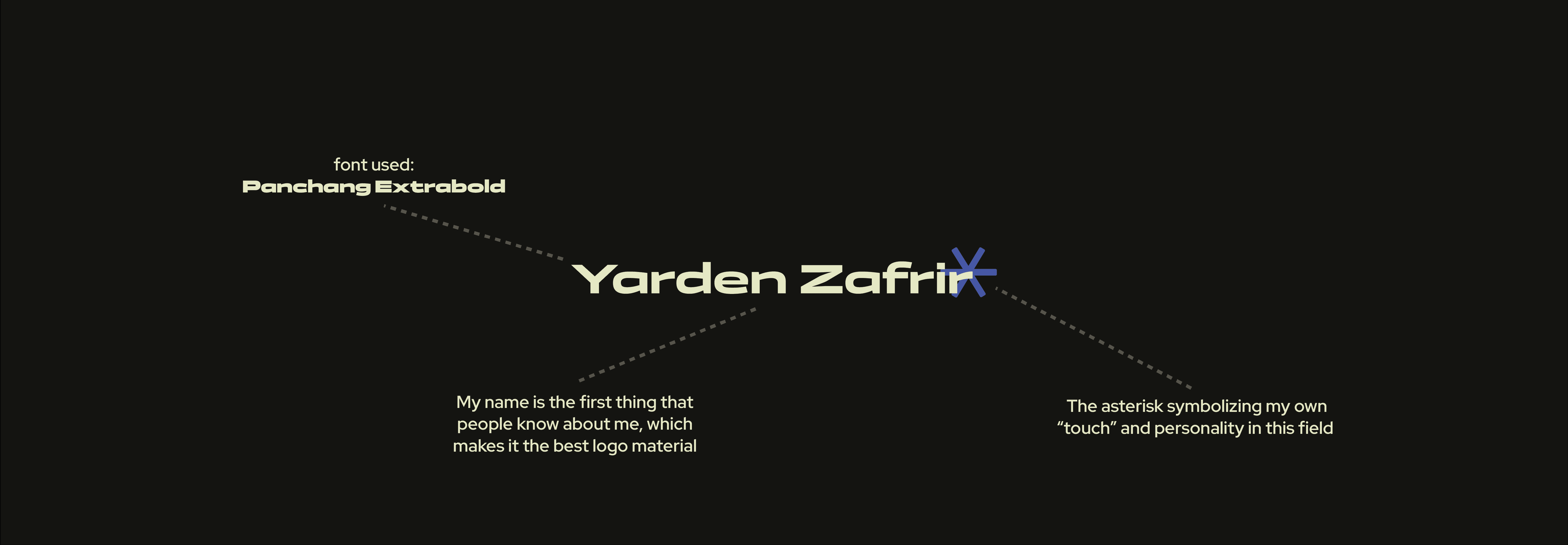
Full logo explaination
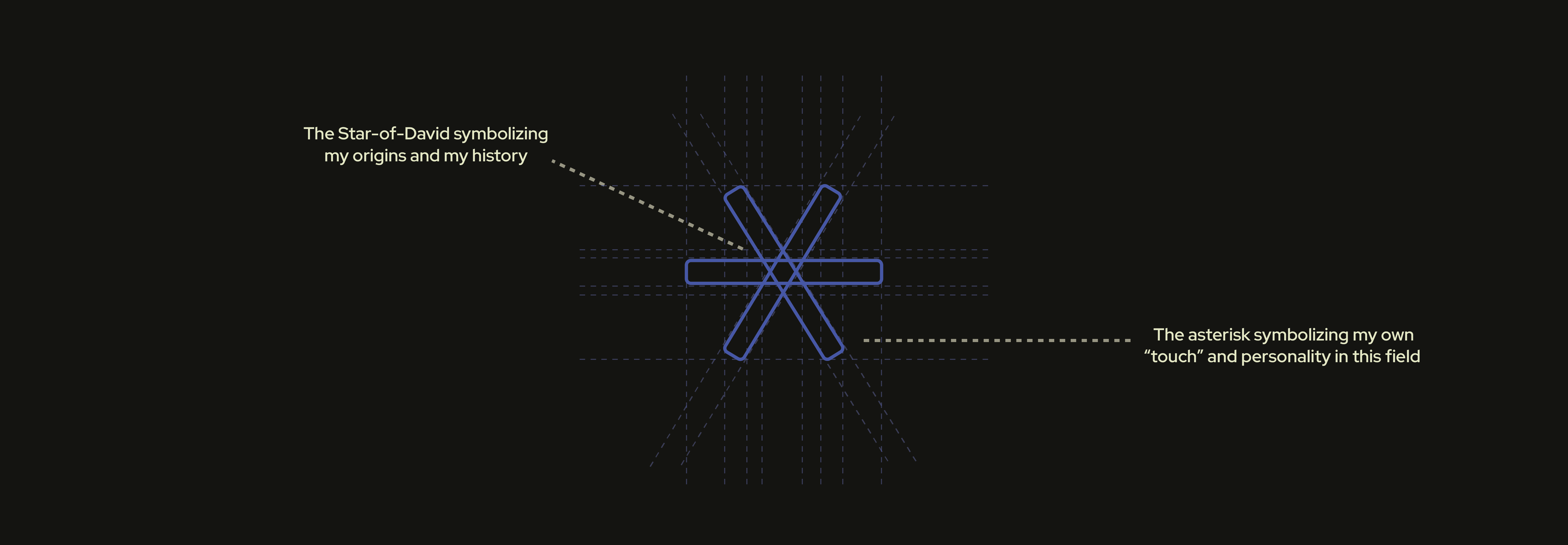
Fulllogomark explaination
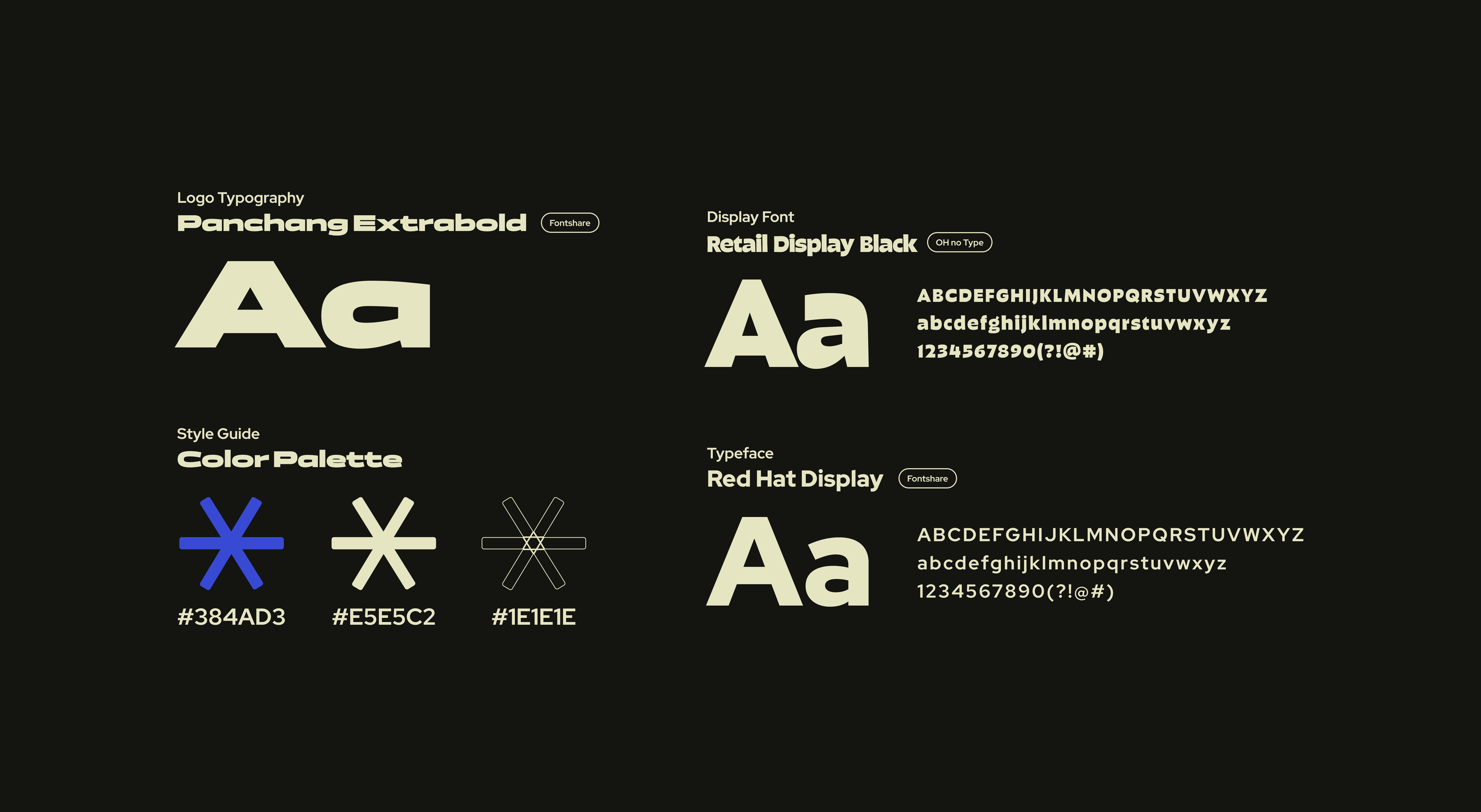
Typography & Color pallette
The survey
I conducted an online survey that engaged over 120 participants from UX design & HR communities on WhatsApp, who fit into my target user demographics. The results are presented here.
Additionally, I consulted with senior professionals at leading tech companies, who have extensive experience in hiring product designers. I gathered insights about their hiring process, including their goals, needs, and constraints when reviewing candidate portfolios.
30-60 Seconds
is the average time recruiters and hiring managers reported spending to decide if candidates are a good fit.
94.7%
of the respondents always review candidate portfolios on desktops, not on mobile devices.
78.2%
Of the respondents indicated that they spend most of their time reviewing case studies, only briefly viewing other pages.
Conclusions
From the survey results, several key conclusions emerged that significantly shaped my approach to designing my portfolio.
First, the overwhelming preference for reviewing portfolios on desktop devices underscored the need for a desktop-first design strategy.
Second, the fact that hiring managers and recruiters spend most of their time on case studies highlighted the importance of making these sections as comprehensive and engaging as possible.
This insight led me to prioritize the clarity and detail of my case studies, ensuring they effectively communicate my skills and thought process.
Additionally, the feedback from industry seniors provided valuable perspectives on what makes a portfolio stand out, guiding me to fine-tune the content to meet the specific needs and expectations of those reviewing my work.
Product-like treat
The portfolio is my business card in the industry, so I treat the portfolio like any other project I design.
Short & sweet
Focus on visuals and keep text brief to prevent cognitive fatigue. The goal is for viewers to grasp the concept quickly, not to read a novel.
Detailed projects
Showing how I think and the whole process step by step to bring out the potential and my skill set to the front.
Personas
When I set out to create personas for my project, I knew the foundation of my design needed to be solid, built on real data from actual users. As I sifted through the responses, patterns began to emerge—common challenges, shared needs, and distinct goals painted a vivid picture of my potential users.
From these insights, I crafted personas, each with their own story, meticulously outlined to reflect the lived experiences and daily realities of my audience. These weren't just hypothetical characters; they were composites of real-world data, tailored to guide my design decisions.
This approach ensured that every element of my design was attuned to the actual needs and pain points of those it aimed to serve, turning raw data into stories that not only informed but inspired my work.
This approach ensured that every element of my design was attuned to the actual needs and pain points of those it aimed to serve, turning raw data into stories that not only informed but inspired my work.
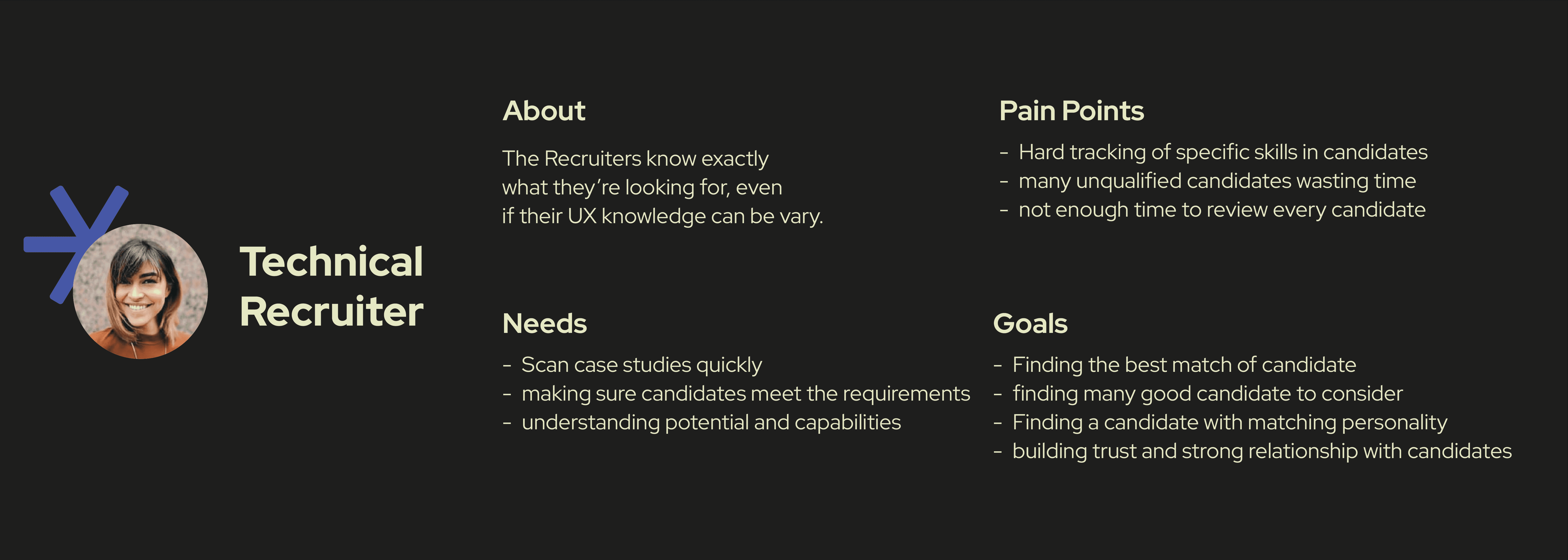
Persona #1
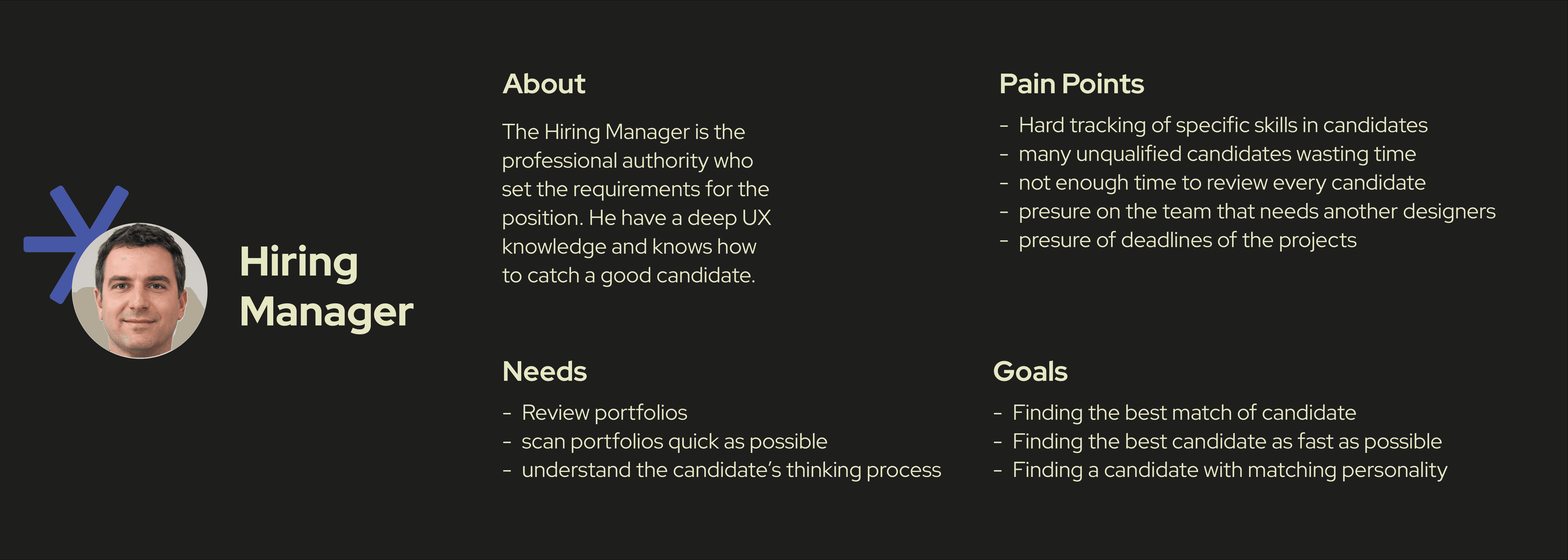
Persona #2
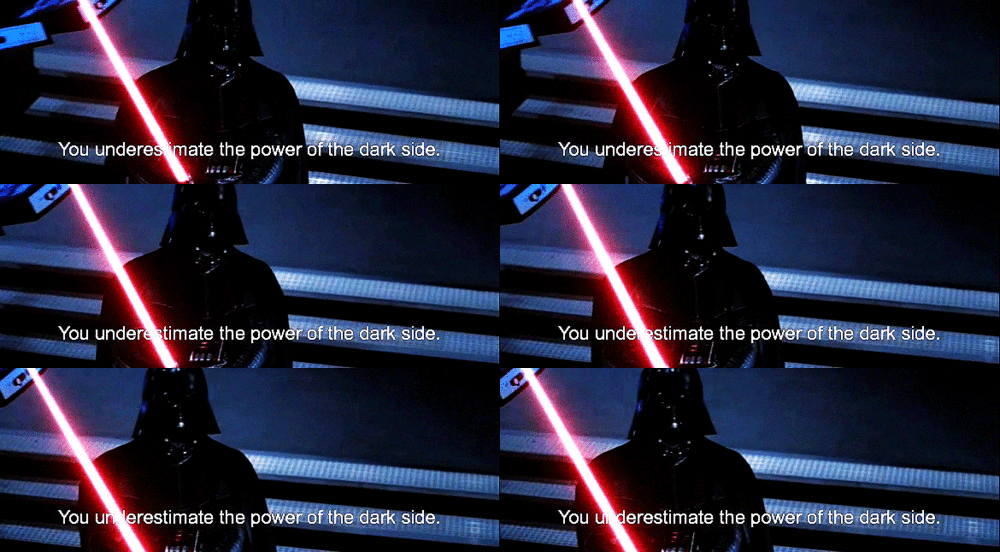
Welcome to the dark side
In designing the toggle feature for light and dark modes, I faced a creative and functional dilemma.
Aesthetically, the dark mode offered a sleek, modern look that enhanced visual elements, making the interface stylish and engaging.
However, I recognized the practical need for a light mode, which is often favored for its superior readability, especially in environments with ample ambient light or for users with specific visual preferences.
To accommodate both needs, I implemented a toggle switch, allowing users to choose between modes based on their personal preference or situational needs.
This solution not only respects the aesthetic appeal of the dark mode but also upholds the usability and accessibility standards that are crucial for a broad and diverse user base.
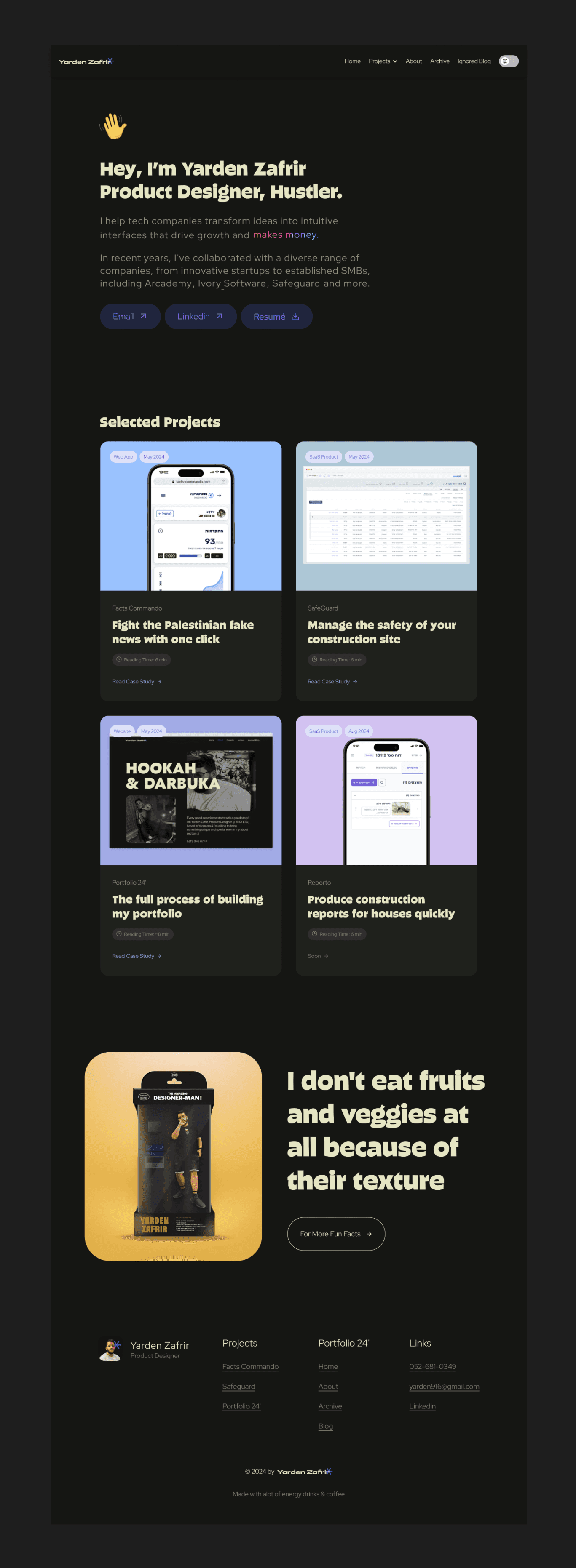
Main homepage
The reason
I was determined to infuse my portfolio with my personality and character, weary of the ubiquitous template-built portfolios. My research revealed that hiring managers often experience burnout from encountering similar-looking portfolios, so I aimed not only to stand out but also to bring a smile to their faces as they viewed mine.
The dissonance
Despite knowing that portfolios need to be intuitive, simple, and easy to understand - which could restrict how much personality I could express - I wanted to balance creativity with clarity.
Dr. Jeckyll & Mr. Hyde
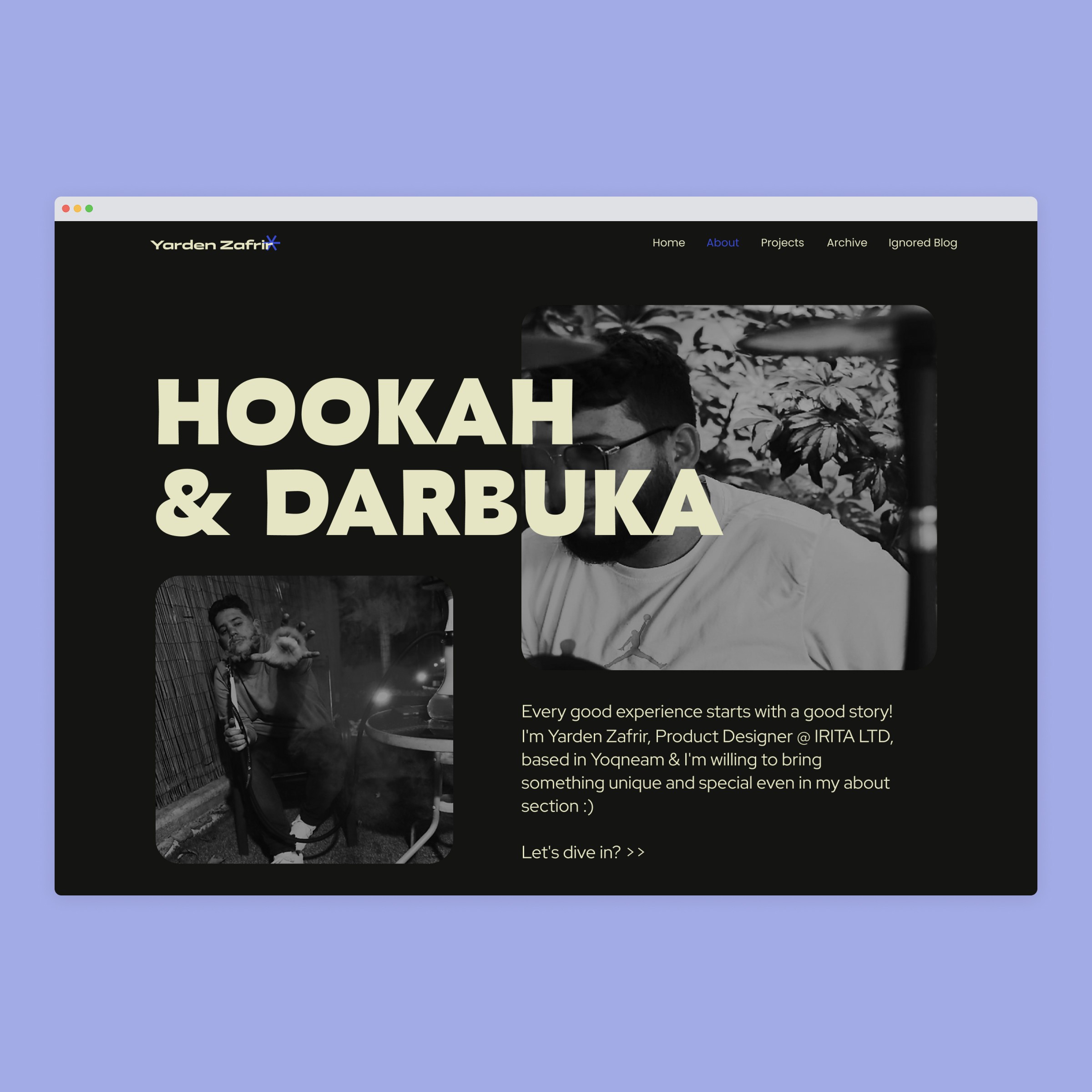
So, I opted for a minimal and straightforward approach like Dr. Jekyll on the homepage, while allowing for a more colorful, experimental, and edgy presentation like Mr. Hyde on the about page.
This strategy provided a clear and professional entry point, with a deeper, more personal expression of my identity just a click away.

The About Page
What did I learned?
Through this project, I learned the importance of balancing personal expression with professional clarity in design.
Integrating my own style while maintaining an accessible and intuitive user interface showed me that creativity need not be sacrificed for functionality.
I also gained insight into the preferences of hiring managers, understanding that while they seek professionalism, they also appreciate a touch of uniqueness that makes a portfolio memorable.
This experience has sharpened my skills in strategic design thinking, allowing me to effectively communicate my identity through my work while adhering to usability standards.
Moving forward, these lessons will guide me in creating designs that are not only visually appealing but also deeply resonant with the audience.


Yarden Zafrir
Product Designer, Hustler
I help tech companies transform ideas into clear interfaces that drive growth and make money.
©2026by me & ☕
1:10:25
is the average time recruiters and hiring managers reported spending to decide if candidates are a good fit.
30-60 Seconds
94.7%
of the respondents always review candidate portfolios on desktops, not on mobile devices.
Of the respondents indicated that they spend most of their time reviewing case studies, only briefly viewing other pages.
78.2%
Portfolio 24'
Portfolio Website
Year
2024
Sector
Private, Marketing
Skills
Product Design, UXR, Lead, PM
Portfolio 24'
Portfolio Website
Year
2023
Sector
Construction ERP
Skills
Product Design
Project highlights
"Conducted mixed-method research with 120+ recruiters, and hiring managers."
User Reseacrh
"Prioritized desktop-first design based on research"
Research Implementation
"Optimized for the 30-60 second recruiter review window, based on user research."
Research Implementation
"Defined the product’s visual language and branding"
Visual Design
"Kept the homepage simple, while making the About page more personal."
Content Strategy
"Boosted recruiter-to-call conversion from 12% to 38% with strategic redesign."
Outcomes
"We worked with Yarden to create the design for our product, and it felt like we added a new partner to the team. Yarden guided us, advised us, and built the product in an exceptional way"
Alex GoldCEO, Arcademy
Problem
The problem is twofold: first, the sheer volume of portfolios available today creates intense competition, making it exceedingly difficult for any single portfolio to capture attention.
Second, this vast array of portfolios includes many that are poorly executed, contributing to a sense of inflation in the market.
Potential employers and clients must wade through this overwhelming mix of quality and mediocrity, seeking out those rare portfolios that not only demonstrate exceptional skill but also resonate on a personal level.
This environment demands that a portfolio be meticulously crafted to stand out from the crowd by clearly showcasing superior design abilities and a distinct personal brand.
This environment demands that a portfolio be meticulously crafted to stand out from the crowd by clearly showcasing superior design abilities and a distinct personal brand.
KS the mutag
First of all, coffee.
and alot of it.
To design the brand of my portfolio and present myself effectively in my UX case study, I embarked on a thoughtful process that involved deep self-reflection and strategic planning.
On one hand, my design needs to embody simplicity and intuitiveness, ensuring that I "won't make the users think" too hard to understand like Norman's said, in a fast-pacing and very limited time for each portfolio.
and alot of it.
To design the brand of my portfolio and present myself effectively in my UX case study, I embarked on a thoughtful process that involved deep self-reflection and strategic planning.
On one hand, my design needs to embody simplicity and intuitiveness, ensuring that I "won't make the users think" too hard to understand like Norman's said, in a fast-pacing and very limited time for each portfolio.
On the other hand, it's crucial that my work stands out in a crowded field, striking a balance between being distinctively memorable and effortlessly usable.
I began by identifying the unique qualities and skills that differentiate me from other designers, focusing on my strengths in UX strategy and creative problem-solving.
I began by identifying the unique qualities and skills that differentiate me from other designers, focusing on my strengths in UX strategy and creative problem-solving.
Full logo explaination
Fulllogomark explaination
Typography & Color pallette
The survey
I conducted an online survey that engaged over 120 participants from UX design & HR communities on WhatsApp, who fit into my target user demographics. The results are presented here.
Additionally, I consulted with senior professionals at leading tech companies, who have extensive experience in hiring product designers. I gathered insights about their hiring process, including their goals, needs, and constraints when reviewing candidate portfolios.
30-60 Seconds
is the average time recruiters and hiring managers reported spending to decide if candidates are a good fit.
94.7%
of the respondents always review candidate portfolios on desktops, not on mobile devices.
78.2%
Of the respondents indicated that they spend most of their time reviewing case studies, only briefly viewing other pages.
Conclusions
From the survey results, several key conclusions emerged that significantly shaped my approach to designing my portfolio.
First, the overwhelming preference for reviewing portfolios on desktop devices underscored the need for a desktop-first design strategy.
Second, the fact that hiring managers and recruiters spend most of their time on case studies highlighted the importance of making these sections as comprehensive and engaging as possible.
This insight led me to prioritize the clarity and detail of my case studies, ensuring they effectively communicate my skills and thought process.
Additionally, the feedback from industry seniors provided valuable perspectives on what makes a portfolio stand out, guiding me to fine-tune the content to meet the specific needs and expectations of those reviewing my work.
Product-like treat
The portfolio is my business card in the industry, so I treat the portfolio like any other project I design.
Short & sweet
Focus on visuals and keep text brief to prevent cognitive fatigue. The goal is for viewers to grasp the concept quickly, not to read a novel.
Detailed projects
Showing how I think and the whole process step by step to bring out the potential and my skill set to the front.
Personas
When I set out to create personas for my project, I knew the foundation of my design needed to be solid, built on real data from actual users. As I sifted through the responses, patterns began to emerge—common challenges, shared needs, and distinct goals painted a vivid picture of my potential users.
From these insights, I crafted personas, each with their own story, meticulously outlined to reflect the lived experiences and daily realities of my audience. These weren't just hypothetical characters; they were composites of real-world data, tailored to guide my design decisions.
This approach ensured that every element of my design was attuned to the actual needs and pain points of those it aimed to serve, turning raw data into stories that not only informed but inspired my work.
This approach ensured that every element of my design was attuned to the actual needs and pain points of those it aimed to serve, turning raw data into stories that not only informed but inspired my work.
Persona #1
Persona #2
Welcome to the dark side
In designing the toggle feature for light and dark modes, I faced a creative and functional dilemma.
Aesthetically, the dark mode offered a sleek, modern look that enhanced visual elements, making the interface stylish and engaging.
However, I recognized the practical need for a light mode, which is often favored for its superior readability, especially in environments with ample ambient light or for users with specific visual preferences.
To accommodate both needs, I implemented a toggle switch, allowing users to choose between modes based on their personal preference or situational needs.
This solution not only respects the aesthetic appeal of the dark mode but also upholds the usability and accessibility standards that are crucial for a broad and diverse user base.
Main homepage
The reason
I was determined to infuse my portfolio with my personality and character, weary of the ubiquitous template-built portfolios. My research revealed that hiring managers often experience burnout from encountering similar-looking portfolios, so I aimed not only to stand out but also to bring a smile to their faces as they viewed mine.
The dissonance
Despite knowing that portfolios need to be intuitive, simple, and easy to understand - which could restrict how much personality I could express - I wanted to balance creativity with clarity.
Dr. Jeckyll & Mr. Hyde
So, I opted for a minimal and straightforward approach like Dr. Jekyll on the homepage, while allowing for a more colorful, experimental, and edgy presentation like Mr. Hyde on the about page.
This strategy provided a clear and professional entry point, with a deeper, more personal expression of my identity just a click away.
The About Page
What did I learned?
Through this project, I learned the importance of balancing personal expression with professional clarity in design.
Integrating my own style while maintaining an accessible and intuitive user interface showed me that creativity need not be sacrificed for functionality.
I also gained insight into the preferences of hiring managers, understanding that while they seek professionalism, they also appreciate a touch of uniqueness that makes a portfolio memorable.
This experience has sharpened my skills in strategic design thinking, allowing me to effectively communicate my identity through my work while adhering to usability standards.
Moving forward, these lessons will guide me in creating designs that are not only visually appealing but also deeply resonant with the audience.
Yarden Zafrir
Product Designer, Hustler
I help tech companies transform ideas into clear interfaces that drive growth and make money.
©2026by me & ☕
1:10:25
is the average time recruiters and hiring managers reported spending to decide if candidates are a good fit.
30-60 Seconds
94.7%
of the respondents always review candidate portfolios on desktops, not on mobile devices.
Of the respondents indicated that they spend most of their time reviewing case studies, only briefly viewing other pages.